Stop Writing 'Patching Errors': A Practical Guide to Meaningful Git Commits
Why clear commit messages are your future self's best friend, and how to use Conventional Commits to make writing them painless.
They say there is nothing harder in computer science than naming variables. Personally, I think coming up with meaningful Git commit messages is a very close second. It is one of those deceptively simple tasks that quickly becomes daunting when you are in the zone and just want to push your code.
I know this from experience. While digging through some of my older repositories, I stumbled on a commit I made on August 28th, 2022:

It simply said: “Patching Errors.”
No context. No details. Who writes that in this day and age? (Well, past me did).
Why Better Commit Messages Matter
Git enters a completely different realm the moment you start working on a team. If you do not believe me, open up any of your personal projects, run git log, and read your old commits.
Six months from now, you will have absolutely no idea what “Errors” you patched. Now, scale that up: if you cannot remember your own changes, your teammates do not stand a chance.
Writing descriptive commit messages is worth the extra ten seconds because it:
- Saves time on debugging: Future readers (including you) can understand what changed and why without having to reverse-engineer the entire diff.
- Makes rollbacks painless: If a bug slips into production, clear messages help you quickly identify which commit introduced the issue so you can revert it.
- Automates release notes: Many modern teams use scripts to parse commit logs and generate clean, user-facing changelogs automatically.
The Anatomy of a Good Commit Message
Your terminal gives you a couple of ways to write your commits.
The Basic Version
Great for quick, straightforward updates:
git commit -m "Fix syntax error in database config"
The Detailed Version
Perfect for complex changes that require a bit of explanation:
git commit -m "Add password hashing to user registration" -m "Using bcrypt with a salt round of 10 to secure user passwords on signup."
Did you make a mistake?
If you make a typo or forget to stage a file in your most recent (unpushed) commit, you can fix it using:
git commit --amend
A quick word of warning: Amending is incredibly useful for cleaning up your local history, but please refrain from amending commits that you have already pushed to a shared repository. Rewriting public history can cause absolute chaos for your teammates.
Enter: Conventional Commits
Instead of staring at a blank terminal trying to be poetic, you can use Conventional Commits to give your messages instant structure.
The standard blueprint looks like this:
<type>[optional scope]: <description>

[optional body]

[optional footer(s)]
The Common Commit Types
feat: You added a shiny new feature to the codebase.fix: You squashed a bug.refactor: You restructured code to make it cleaner without changing its actual behavior or adding features.chore: Routine maintenance tasks that do not touch source or test files (like updating dependencies or tweaking.gitignore).perf: A specialized refactor focused entirely on speeding things up.ci/ops: Changes to your deployment scripts, pipelines, infrastructure, or backups.build: Updates that affect the build system, project versions, or package managers.docs: Writing or updating documentation, like yourREADME.md.style: Formatting tweaks—think line breaks, missing semicolons, or whitespace—that do not change how the code runs.test: Adding missing tests or fixing broken ones.revert: Undoing a previous commit.
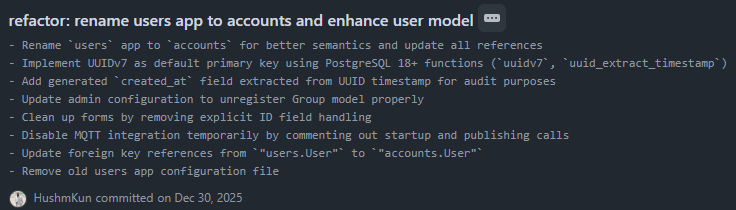
Here is what a complete conventional commit looks like in action:
Rules for Writing Great Commit Messages
If you want your repository history to look incredibly professional, keep these classic rules in mind:
- Keep it concise: Try to limit your subject line to 50 characters so it fits neatly in GitHub’s UI.
- Use sentence case: Start your description with a capital letter.
- Drop the period: Do not end your subject line with a trailing period.
- Give it breathing room: Always separate your subject line from the body with a blank line.
- Watch your width: Wrap the body of your message at 72 characters so it remains readable in a standard terminal.
- Focus on the “Why”: Use the body of the message to explain why you made the change, rather than how (the code itself shows the “how”).
- Write in the imperative mood: Write your subject line like you are giving a command to the codebase (e.g.,
feat: Add unit testsinstead ofAdded unit tests). A good rule of thumb is that the message should complete the sentence: “If applied, this commit will…”
Bonus point
Some people like to have an AI chat or prompt that gets the current staged git diff, formats it into the desired format (i.e. mentioned above) to write commit messages (I neither approve nor condone, To each his own I guess).
It takes a little bit of practice to get used to the structure, but once it becomes second nature, you will never want to go back to “tweaked a few things” again.
Follow me for more, Bye.
